Design Your Culinary Legacy: The CookBook Template for Canva
If you are anything like me, you have a drawer or a digital folder somewhere that is bursting at the seams with recipe ideas. Some are scribbled on napkins, some are screenshots from Instagram, and others are passed down from grandparents in fading ink. We all want a way to organize this chaos into something beautiful. The problem is, creating a cookbook from scratch usually requires expensive design software or hiring a professional. That is exactly why the CookBook Template for Canva is such a game-changer for food bloggers, aspiring chefs, and anyone wanting to preserve family history. It bridges the gap between a messy recipe box and a polished, printed publication.
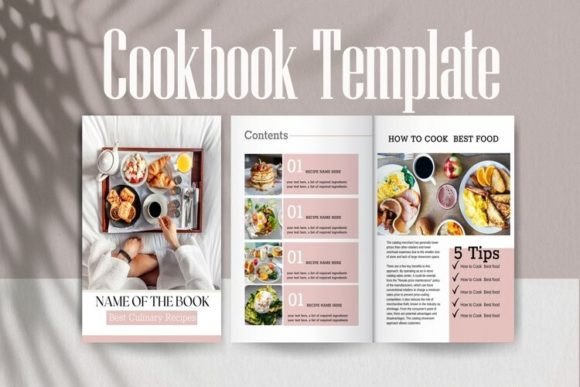
When you first open this template, the immediate impression is one of organized elegance. It doesn't scream for attention with loud graphics; instead, it uses a modern typography layout that lets your food photography do the talking. The visual personality of the CookBook Template for Canva is clean, airy, and professional. It feels like a blank canvas that is already primed for high-end editorial design. The spacing between elements—the margins, the gutters, the line height—has been calculated to ensure that the final product feels like a book you’d actually buy in a store, not just a PDF you printed at home. It strikes a perfect balance between being stylish enough to be engaging, yet neutral enough to fit any culinary genre, from rustic farmhouse baking to modern vegan fusion.
Crafting Your Visual Story
One of the most critical aspects of any publication is how the text interacts with the images. In the world of brand identity, consistency is king. This template provides a framework that helps you maintain that consistency across dozens of pages. Because it is designed for Canva, the customization is incredibly fluid. You aren't locked into a specific serif font or sans serif font; you can change the typography to match your specific voice. If you are a baker with a whimsical brand, you might swap the headers for a playful script font or a handwritten font. If you are a nutritionist, you might stick with a clean, geometric typeface to convey authority.
The layout includes dedicated spaces for your content that guide the reader's eye. This is crucial for readability. A recipe isn't just a block of text; it requires a visual hierarchy. You need the ingredients list to be scannable, the instructions to be numbered clearly, and the headnotes to be distinct. The CookBook Template for Canva handles this hierarchy beautifully. It uses weight and size to separate the title from the body copy, ensuring that someone can glance at the page and immediately know where to find the baking temperature. This attention to visual hierarchy is what separates amateur documents from professional design assets.
Practical Applications: Beyond the Kitchen
While the name suggests it is strictly for food, the utility of these templates extends much further. As a creative font and layout framework, you can repurpose these pages for various digital and print projects. Think about packaging design inserts for artisanal goods. If you sell homemade jams or spice blends, you could use the content pages to create a "How to Use" booklet that ships with your product. This adds immense value to your small business offerings and elevates the unboxing experience.
Furthermore, the template is excellent for social media graphics. The "content pages" can be easily adapted into carousel posts for Instagram or Pinterest. You can take a single recipe spread and break it down into swipeable slides. This ensures your brand identity remains consistent whether someone is looking at your printed book or your phone screen. For marketers and entrepreneurs, this is a goldmine. You can create lead magnets—free mini-ebooks—to grow your email list. A "5 Quick Weeknight Dinners" PDF created with this template looks infinitely more valuable than a simple Word document, increasing the perceived worth of your brand.
Technical Flexibility and Design Strategy
Let's talk about the nuts and bolts. The size is set to US Letter (8.5" by 11"), which is the standard for home printing and most on-demand printing services. This makes the transition from screen to paper seamless. The template includes specific sections like "About the Author" and "Contacts." Don't skip these. In the realm of content creation, these pages are prime real estate for building a connection with your audience. Use the "About the Author" page to tell your story. Why do you cook? What is your philosophy? This humanizes your work and builds trust.
When customizing, pay close attention to your font pairing. A common mistake is choosing two fonts that are too similar, which creates visual conflict, or too different, which creates chaos. A good rule of thumb when using the CookBook Template for Canva is to pair a bold, decorative display font for the recipe titles with a highly legible body font for the instructions. Since the template allows you to copy, delete, and rearrange pages, you have the freedom to experiment. Duplicate a page and try three different color schemes. See how a premium font changes the mood compared to a standard system font.
Finally, consider the licensing. If you plan to sell this cookbook or use it for commercial purposes, ensure that any commercial font or stock photo you insert into the template is properly licensed for that use. The template itself is a tool, but the assets you bring into it must be vetted. By combining the structural integrity of the CookBook Template for Canva with your unique culinary voice and properly licensed assets, you create a product that is not only beautiful but legally sound and ready for the market.
Ultimately, this is about more than just putting recipes on paper. It is about creating a legacy. It is about taking those awesome family recipes and giving them the presentation they deserve. Whether you are a hobbyist making a gift for your kids or a blogger ready to monetize your content, having a professional structure to start with saves you time, money, and the headache of layout design. It empowers you to focus on what you actually love: the food.