Plan Your Dream Garden with This Ultimate Canva Template
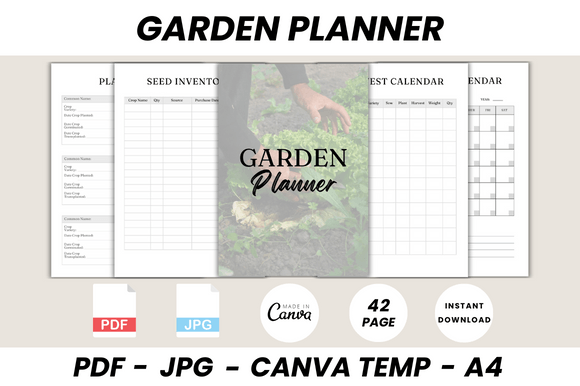
Every beautiful garden starts long before the first seed is planted. It begins with a vision, a strategy, and a solid plan. Yet, for many gardeners, the planning phase is a chaotic mix of scattered notes, forgotten seed packets, and good intentions lost to the season. What if you could centralize your entire gardening world—from seed inventory to harvest tracking—into one beautifully organized, digital planner? The Garden Planner Canva Template is that solution, a comprehensive 42-page system designed to bring order, clarity, and a touch of professional design to your horticultural passion.
Beyond a Simple To-Do List: A Visual Command Center
This isn't just a collection of blank calendars. The Garden Planner Canva Template is a thoughtfully curated suite of pages that functions as a visual command center for your garden. Its personality is one of organized calm, blending practicality with a clean, inviting aesthetic. The style leans into a modern, minimalist design with plenty of white space, making information easy to scan. It uses a harmonious color palette and clear typography to create a sense of professionalism without feeling sterile. This visual approach transforms mundane tasks like logging fertilizer purchases or tracking pest control into engaging, almost satisfying, activities. The overall appeal lies in its ability to make you feel like a serious, strategic gardener, equipped with a tool that respects both your time and your passion.
Where This Planner Truly Shines: From Seed to Screen
The true power of this template is its versatility. As a digital design asset built in Canva, it transcends the limitations of paper. Here’s how it integrates seamlessly into various projects and workflows:
- Personal Garden Journaling: Use it to meticulously plan your raised beds with the Garden Layout pages, track your Seed Starting Log, and create a personalized Plant Profile for each variety you grow. The Seasonal Checklist ensures you never miss a critical window for planting or winterizing.
- Small Business & Market Farming: For those selling produce, the Harvest Tracker, Produce Budget, and Expense Log are invaluable. They provide clear data for managing profitability. The Plant Card and Garden Ideas pages can even be repurposed for creating customer-facing materials or market signage.
- Content Creation & Social Media: Bloggers and influencers can use the Veggie Calendar and Fruits Calendar to plan content around seasonal availability. The clean, designed pages are perfect for creating Pinterest pins, Instagram story slides, or YouTube tutorial guides, establishing a consistent and professional brand identity.
- Educational & Community Use: Teachers leading school garden programs or community garden coordinators can adapt the Crop Rotation, Soil Status, and Watering Schedule templates for group use, making complex concepts accessible and trackable for everyone involved.
This flexibility makes it more than a planner; it's a foundational design asset that supports the entire lifecycle of your gardening endeavors, whether for personal joy or commercial gain.
Practical Guidance: Making the Template Your Own
Adopting any new system requires a bit of strategy. To get the most out of the Garden Planner Canva Template, consider these practical steps:
Evaluate Your Project Fit: Before diving in, ask what you need most. Are you a visual planner who needs the Garden Layout pages? A data-driven grower who will live in the Harvest Tracker? Identify your top 5-7 priority pages and start there. This prevents overwhelm and ensures immediate utility.
Master the Editable Files: The template’s strength is its editability. Using a free Canva account, you can personalize everything. Adjust the color scheme to match your garden shed or favorite flower. Change the font to one that feels more "you"—perhaps swapping a clean sans serif font for a softer, handwritten font on your personal notes pages. This customization fosters a deeper connection to the tool.
Test Your Workflow: Integrate the planner into your actual routine. Use the Monthly To Do List on the first of each month. Refer to the Garden Calendar every Sunday evening to plan your week. The goal is to make it a habit, not a chore. The Seed Inventory and Fertilizers Inventory pages become powerful only when kept consistently updated.
Leverage the System for Consistency: The included Plant Log and Plant List pages are key to building a valuable knowledge base over the years. Documenting what worked (and what didn’t) in your specific microclimate turns you into a more successful gardener. This consistency in record-keeping is what builds real expertise.
Ultimately, the Garden Planner Canva Template is a catalyst. It provides the structure so your creativity and dedication can flourish. It’s a professional-grade toolkit for the passionate hobbyist, the market gardener, and the creative content creator alike, proving that the most fruitful gardens are indeed those that are well-planned.