Design Your Own Deck: A Tarot Card Template for Canva
There is something deeply personal about holding a deck of cards that you designed yourself. Whether you are creating a unique gift, launching a product line for your small business, or just exploring a creative hobby, the visual language of tarot and oracle cards is powerful. However, the technical barriers—sizing, bleeds, and layout grids—often stop creatives before they even start. That is where a practical design solution comes in. Using a Tarot Card Template for Canva removes the guesswork, allowing you to focus entirely on the art and narrative of your deck.
This isn't about complex software or expensive printing setups. It is about accessibility. By leveraging a drag-and-drop interface, you can transform your ideas into tangible, professional-grade cards in a matter of minutes. This approach bridges the gap between a rough concept and a polished physical product, making it an invaluable asset for designers, hobbyists, and entrepreneurs alike.
Streamlining the Creative Workflow
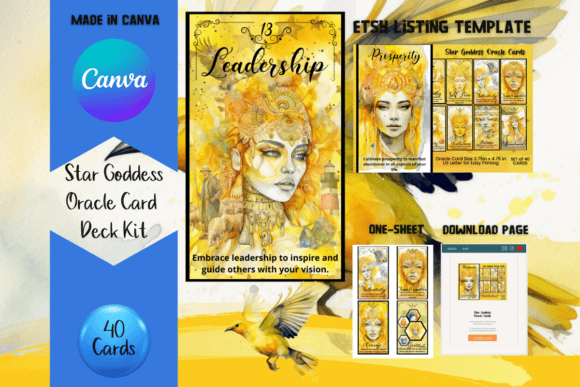
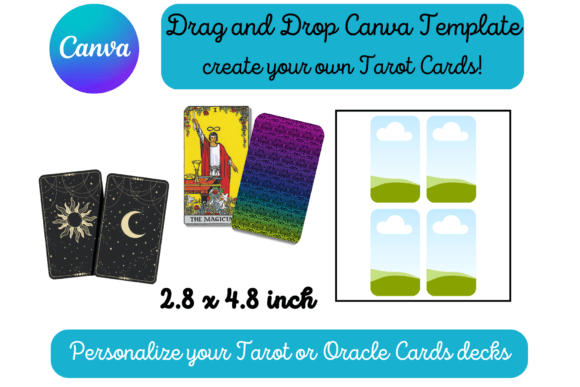
The core appeal of this specific Tarot Card Template for Canva lies in its simplicity and precision. The file includes two distinct pages of drag-and-drop templates. This structure is designed to give you variety without overwhelming you. You are not just getting a blank canvas; you are getting a structured framework that respects the history of tarot design while allowing for modern customization.
One of the biggest frustrations in DIY card making is getting the dimensions right. A standard tarot card measures 2.75 inches by 4.75 inches. If you have ever tried to manually calculate pixel ratios for print, you know how easily things can go wrong—edges get cut off, or the resolution falls flat. This template solves that issue completely. The frames are pre-sized to the exact standard dimensions. You simply drag your graphics, typography, and illustrations into the frame. When you are finished, you print each page as a standard 8.5 x 11 inch document. The result is a perfectly sized card, ready to be cut and used.
From Digital Concept to Physical Object
For the entrepreneur or content creator, speed to market is vital. Imagine you are a spiritual blogger or a coach who wants to create a proprietary deck of affirmation cards for your clients. Traditionally, this would require hiring a graphic designer and spending weeks on revisions. With this Tarot Card Template for Canva, you maintain full creative control. You can experiment with different color palettes, swap out background textures, and test various font pairings in real-time.
The visual appeal of the templates is intentionally versatile. They act as a neutral stage for your brand identity. Whether your aesthetic is vintage and esoteric, or minimalist and modern, the template adapts. It provides the necessary "safe zones" for text and imagery, ensuring that your final design looks balanced and intentional. This is practical design strategy: using design assets that enhance your work rather than dictating it.
Strategic Applications for Modern Creators
While the obvious use case is for spiritual divination, the applications for a Tarot Card Template for Canva extend far beyond traditional readings. In the world of brand strategy, unique collateral can set you apart. Consider using the template to create:
- Brand Story Cards: A deck that explains your company values or history.
- Prompt Cards: For workshops or team-building exercises.
- Flashcards: For educational content creators teaching complex subjects.
- Collectible Trading Cards: For artists selling prints or merchandise at conventions.
The standard sizing ensures compatibility with protective sleeves and boxes, which is a crucial detail for anyone looking to sell their decks. It shows a level of professionalism that audiences appreciate. When you hand a client a card that feels substantial and well-cut, it reinforces your brand identity and attention to detail.
Design Readability and Visual Hierarchy
When working with small format print design, readability is paramount. A common mistake in DIY card creation is overcrowding. Because the cards are relatively small (2.75 x 4.75 inches), you have to be strategic about visual hierarchy. The template frames help guide you here. They encourage you to keep critical elements centered and away from the edges.
Regarding typography, this is where you can truly define the personality of your deck. If you are aiming for a mystical vibe, a script font or handwritten font might be appropriate for card titles, but be careful with body text. For keywords or instructions on the card, a clean sans serif font is often more legible at small sizes. Conversely, a serif font can lend an air of authority and tradition to your designs. The Canva platform makes it easy to mix and match these typefaces, allowing you to find the perfect font pairing that balances style with function.
Practical Execution and Final Polish
Once your designs are complete, the transition to physical product is seamless. Because the Tarot Card Template for Canva is based on standard letter-sized paper (8.5 x 11 inches), you have flexibility in how you produce them. You can print them at home using heavy cardstock for a handmade feel, or upload the PDF to a professional print-on-demand service for a more polished finish.
When preparing your files for print, pay attention to your background colors. If you are using a dark, rich background to evoke a modern typography aesthetic, ensure your printer settings are adjusted to handle high ink coverage. Also, remember that the template provides the frame, but the cutting is up to you. I always recommend using a paper trimmer rather than scissors to ensure those crisp, straight edges that make a deck feel professional.
For those looking to sell these decks, consider the unboxing experience. The cards are only one part of the product. You might use the same Canva account to design a matching tuck box or a guidebook. Using consistent design assets across all these elements creates a cohesive product that stands out in a crowded market.
Why This Template Works for You
Ultimately, this resource is about removing friction from the creative process. It serves as a bridge between your imagination and the final physical object. Whether you are a seasoned graphic designer looking for a quick layout solution, or a hobbyist creating your first deck, the utility of a pre-formatted, drag-and-drop system is undeniable. It saves time, ensures technical accuracy, and empowers you to produce commercial font and graphic combinations that look stunning.
By using this Tarot Card Template for Canva, you are not just making cards; you are crafting an experience. You are taking abstract ideas and grounding them in a tangible format that people can hold, shuffle, and cherish. In a digital world, that physical connection is a powerful tool for any creator.