Unlocking Creative Freedom with Editable Brush Stroke Canva Frames
There’s a certain energy in a hand-painted brush stroke that digital perfection can’t replicate. It carries the wobble of a human hand, the texture of loaded bristles, and an organic imperfection that feels authentic. For designers, marketers, and creators, capturing that energy often means spending hours in complex software or settling for static clip art. That’s where the practical utility of Editable Brush Stroke Canva Frames comes into play. This isn't just a set of decorative elements; it's a versatile design system built directly into the Canva editor, offering a blend of artistic flair and user-friendly control. The core appeal lies in its duality: you get the raw, expressive character of hand-drawn art combined with the complete customization power of a modern, drag-and-drop template. You’re not just placing an image; you’re shaping a dynamic design asset that adapts to your vision.
The Anatomy of an Expressive Design Tool
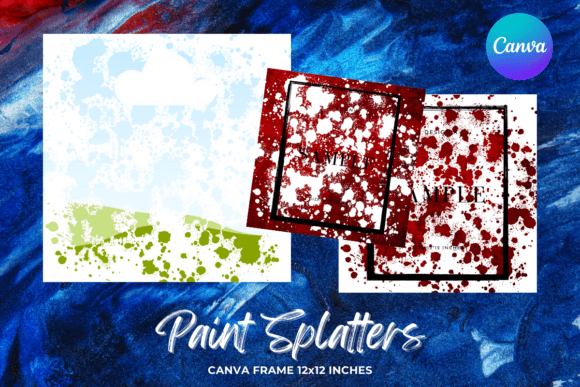
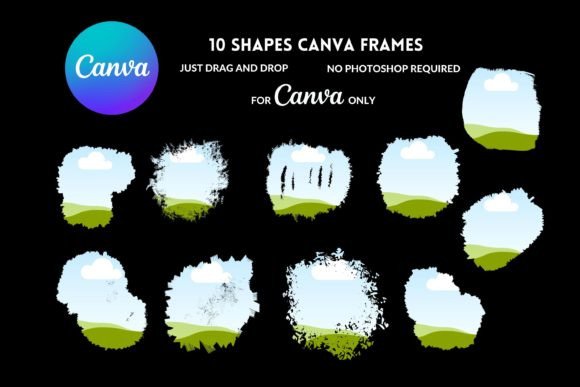
Visually, these frames are defined by their textured, grungy backgrounds and bold, gestural strokes. Imagine the uneven edges of a charcoal sketch, the splatter of ink, or the layered wash of watercolor—these are the visual hallmarks. The personality is decidedly artistic, unpolished, and human. This style stands in stark contrast to the clean, geometric lines of a modern sans serif font or the precise curves of a classic serif font. It’s a creative font that communicates authenticity, creativity, and a handmade quality. The overall appeal for a brand or project is its ability to instantly inject warmth and personality, making it an excellent counterpart to more structured typefaces. When you pair a crisp, professional font with an Editable Brush Stroke Canva Frame, you create a compelling visual tension that captures attention.
The true power, however, is in the "editable" aspect. Delivered as a PDF with a direct link, the templates open seamlessly in a free Canva account. Here, every element is a separate layer. You can resize the brush strokes, change their color to match your brand palette, adjust the opacity, or even delete parts you don’t need. The grunge backgrounds can be filled with your own images or solid colors. This transforms them from static clip art into a dynamic component of your brand identity toolkit. For a small business owner, this means creating consistent social media graphics or marketing materials without needing to commission custom artwork for every single post.
Strategic Applications Across Your Creative Projects
Where do these frames work best? Their strength lies in projects where you need to convey creativity, movement, and a personal touch. Consider their use in logo design for a boutique coffee roaster, a freelance photographer, or an artisan bakery. The brush strokes can frame the business name or icon, adding a layer of tactile quality that a standard digital logo might lack. In editorial design, they make striking pull quotes, chapter headers, or featured image borders for magazines, blogs, and e-books. The texture adds depth and visual interest to flat layouts.
For packaging design, especially for products marketed as organic, handcrafted, or small-batch, these frames can become a central part of the label design, reinforcing the product’s story. In the digital realm, they are invaluable for social media graphics. Imagine a Instagram story template where your photo is nestled inside a dynamic brush stroke frame, or a Pinterest pin where a bold stroke underlines your key message. They also bring life to web design elements like blog post banners, about-us page headers, or promotional pop-ups, breaking the monotony of standard web layouts.
For personal projects, the applications are just as rich. Crafters can use them to design unique invitations, greeting cards, or scrapbook elements. Publishers and bloggers can create cohesive, branded cover images for their digital content. The commercial use license means entrepreneurs and designers can confidently incorporate these assets into client work, merchandise, or products for sale, provided they adhere to the terms of purchase. It’s a professional-grade asset that bridges the gap between personal creativity and commercial application.
Making It Work: Practical Guidance for Flawless Integration
Adopting any new design asset requires a thoughtful approach to ensure it enhances rather than overwhelms your project. First, evaluate the fit. Does the energetic, handmade style of the Editable Brush Stroke Canva Frames align with your brand’s voice? A law firm might find it too casual, while a yoga studio or indie music label would find it perfectly on-brand. Always test font pairings. The organic nature of the frames pairs exceptionally well with clean, geometric sans serif fonts for a modern look, or with elegant serif fonts for a more sophisticated contrast. Avoid pairing them with overly ornate script or handwritten fonts, as the visual competition can create clutter and hurt readability.
Take time to review the included styles within the set. Not every stroke will suit every layout. Some may be more splattered and chaotic, others more fluid and singular. Experiment with layering—place a solid shape behind your text and then overlay a semi-transparent brush stroke for a subtle effect. When it comes to readability, especially in web design or print, ensure there is sufficient contrast between your text and the frame’s background. The grunge textures are fantastic, but they shouldn’t compete with your message. Use the frame to guide the viewer’s eye toward your content, not away from it.
Finally, respect the commercial license. While these are powerful design assets for client work and commercial projects, the terms prohibit reselling the templates themselves as standalone files. Your value comes from the unique, customized designs you create with them. This framework protects the original creator while empowering you with tremendous creative freedom. By integrating these frames strategically, you move beyond generic templates and start building a visual language that is distinctly yours—expressive, professional, and unmistakably human.