Small Pen Wrap Template for Canva: Design Custom Wraps Fast
There’s a unique satisfaction in creating something tangible, especially when it carries your personal brand or a thoughtful, handmade touch. For crafters, small business owners, and anyone with a creative streak, customizing everyday items is a powerful way to stand out. Enter the Small Pen Wrap Template for Canva—a straightforward, drag-and-drop solution designed to turn a simple pen into a miniature canvas for your creativity.
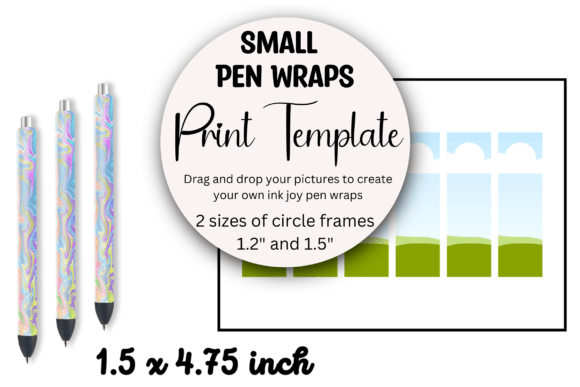
This isn’t about complex graphic design software or steep learning curves. It’s about providing a practical design asset that empowers you to produce professional-looking results in minutes. The template is a single PDF file containing a direct link to a pre-made Canva design. Open it, and you’re greeted with one clean page featuring six distinct, empty template frames. These frames are your starting point, sized perfectly for standard small pens. The visual style is intentionally minimal and functional, offering a neutral foundation that won’t compete with your designs. Its personality is that of a reliable tool—unassuming, efficient, and focused entirely on enabling your vision.
Where This Template Truly Shines: Practical Applications
The beauty of a resource like the Small Pen Wrap Template for Canva lies in its versatility. Its primary strength is in packaging design for small-batch products. Imagine a candle maker including a branded pen with a purchase, a boutique hotel leaving a customized pen in a guest room, or a conference organizer creating swag. This template makes those touches accessible without a designer’s budget.
Beyond commercial use, it’s a gem for personal projects. Create personalized gifts for a bridal shower, design matching pens for a book club, or craft unique favors for a birthday party. For content creators and bloggers, it’s a novel way to create physical merchandise that complements a digital brand. The template’s structure encourages efficiency; you can design six different wraps on one page or duplicate a single favorite design across the page for bulk printing. The ability to isolate one wrap design onto its own page is particularly useful for test prints or when you only need a single, perfect item.
Integrating Your Brand: From Canva Frame to Finished Product
Working with the template is a lesson in practical design workflow. Once inside Canva, you treat each frame like a placeholder for your own graphics, text, and colors. This is where your brand identity comes into play. Select a color palette that aligns with your existing materials. Choose typography that reflects your brand’s voice—perhaps a clean sans serif font for a modern, approachable feel, or a sophisticated serif font for a more traditional, luxurious aesthetic.
The template itself acts as a neutral display font of sorts, in the sense that it presents your work. It ensures consistency, which is paramount for brand recognition. Every pen you produce using the same template will share the same dimensions and professional finish. This consistency builds trust and makes your brand look polished and intentional. You’re not just giving away a pen; you’re delivering a cohesive brand experience.
Consider the visual hierarchy on such a small surface. Your logo or primary message should be the focal point. Supporting information, like a website or social handle, can be smaller. The template’s layout helps you organize these elements logically. For a more dynamic look, you might pair a bold, modern typography style for your name with a subtle script font for a tagline. Experiment with textures, patterns, or simple line art. Because you’re working in Canva, you have access to a vast library of design assets to enhance your wraps without starting from scratch.
Making It Work for You: A Few Practical Tips
Before you dive in, think about your end goal. Are these wraps for a one-time event or an ongoing product line? This will influence your design choices. For longevity, opt for designs that are timeless rather than trend-driven. Always test your design by printing a single sheet first. Check the color accuracy on your printer and ensure the text is legible when scaled down to pen-size. Readability is crucial on a small format—avoid overly ornate or thin fonts for critical information.
The template’s simplicity is its greatest feature. It removes the technical barriers of measuring and setting up documents, letting you focus purely on the creative side. It’s a perfect example of a premium font (in this case, a creative font template) that serves a specific, practical purpose. Whether you’re a marketer creating branded merchandise, an entrepreneur adding a personalized touch to orders, or a hobbyist crafting for friends, this Small Pen Wrap Template for Canva provides the straightforward framework you need to execute your ideas beautifully and efficiently. It’s not about reinventing the wheel; it’s about giving you a better, faster way to make the wheel your own.