Elevate Halloween Decor with 30+ Canva Pumpkin Frames
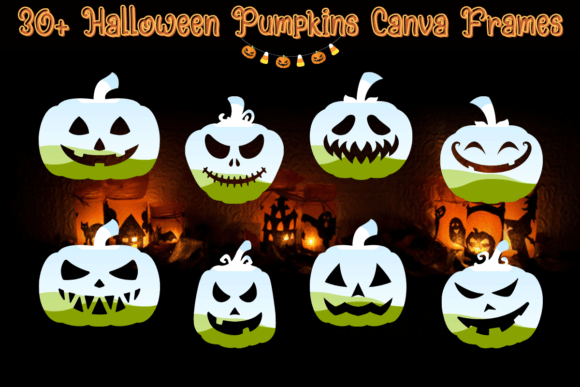
Halloween design often falls into a trap of overused, generic clipart. The difference between a forgettable social media post and a visually compelling brand moment usually comes down to the details. If you are looking to move beyond basic overlays, the 30+ Halloween Pumpkins Canva Frames collection offers a distinct solution. This set of 36 digital templates provides a curated library of pumpkin-themed borders and cutouts, designed to transform standard images into themed visual assets without requiring advanced software skills.
From a design perspective, these frames function as more than just decoration. They serve as structural elements that guide the viewer’s eye. Whether you are a small business owner creating a seasonal flyer or a content creator building a cohesive Instagram grid, the visual language of Halloween requires a specific aesthetic. These frames provide that "eerie" atmosphere while maintaining a polished, professional look. Because they are fully editable within Canva, you have complete control over the color palette, opacity, and texture, allowing you to match the frames precisely to your existing brand identity.
Understanding the Visual Style and Versatility
The appeal of this collection lies in its adaptability. While the core motif is the pumpkin, the stylistic execution varies. You will find frames that lean into a rustic, harvest aesthetic—perfect for family-friendly events or farm-to-table restaurant marketing. Conversely, there are designs that utilize sharper lines and darker tones for a more gothic, horror-inspired vibe suitable for nightclubs or adult-themed parties. This versatility makes the 30+ Halloween Pumpkins Canva Frames a valuable addition to any designer's toolkit, acting much like a flexible display font that anchors a composition.
Consider the practical applications in packaging design and editorial design. If you are a blogger preparing a "Spooky Season" lookbook, a pumpkin frame can isolate a hero image, creating immediate visual hierarchy. For entrepreneurs, these frames can be integrated into product labels or digital coupons. The ability to customize the colors means a neon green pumpkin frame can look futuristic and cyber-punk, while a traditional orange maintains a classic Halloween feel. This adaptability ensures that the assets support, rather than clash with, your primary typography and imagery.
Practical Application for Content Creators and Marketers
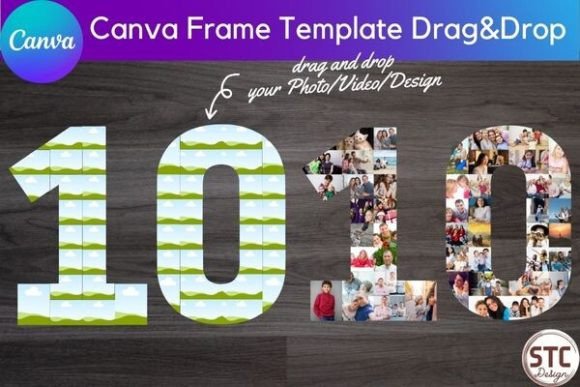
For the modern content creator, speed and consistency are paramount. The drag-and-drop nature of these Canva templates eliminates the friction often associated with design software. You do not need to be a Photoshop expert to apply a complex mask. Instead, you simply upload your photo and place it into the frame. This ease of use is particularly beneficial for social media graphics, where the volume of content required is high. You can rapidly produce a series of Instagram Stories or Pinterest pins that look custom-designed, ensuring your feed remains active and visually engaging throughout October.
Furthermore, these frames serve as excellent design assets for web design. Imagine using a subtle, semi-transparent pumpkin frame as a container for a testimonial on your website, or using a row of small frames to display team members in costume. It adds a layer of personality that standard CSS borders cannot achieve. In logo design or temporary branding for a specific event, these frames can act as a badge or seal, signifying a limited-time offer or a seasonal menu change. This approach elevates the perceived value of your promotion, making it feel more bespoke and intentional.
Strategic Integration and Design Tips
To get the most out of the 30+ Halloween Pumpkins Canva Frames, it is helpful to treat them as you would a premium font or a high-quality stock photo. They require context to shine. If you are pairing these frames with text, pay attention to visual hierarchy. A bold, ornate frame pairs well with a clean sans serif font for body text, preventing the design from becoming cluttered. If your frame has intricate cutouts, ensure your background image has enough contrast to be legible.
Here are a few practical recommendations for implementation:
- Brand Consistency: Use the color picker tool in Canva to match the frame's hue to your primary brand color. This turns a generic Halloween asset into a branded piece of communication.
- Layering Techniques: Don't just place an image inside the frame. Try layering the frame over an image and reducing the opacity to create a watermark effect. This works exceptionally well for background textures in web design.
- Typography Pairing: If you are using the frames for editorial design, pair the organic shapes of the pumpkins with a structured serif font for headlines. The contrast between the curved, natural frame and the sharp typeface creates a sophisticated tension.
- Print vs. Digital: While these are digital files, they translate beautifully to print. Ensure you export your final design at 300 DPI if you plan to use them for physical flyers or posters.
The Value of Digital Assets in Modern Branding
In today's fast-paced digital landscape, having access to on-demand creative fonts and graphic assets is a competitive advantage. The 30+ Halloween Pumpkins Canva Frames represent a cost-effective way to maintain a high standard of brand identity during seasonal campaigns. Unlike hiring a freelance designer for every single social post or menu update, this digital download puts the power directly in your hands.
The collection includes 36 distinct options, offering enough variety to last an entire season without repetition. Whether you are a hobbyist making invitations for a neighborhood party or a marketer running a national campaign, the ability to quickly adapt these frames to fit your specific narrative is invaluable. By focusing on the user experience and the practical utility of the frames, you can create Halloween visuals that are not only spooky but also professional, cohesive, and effective at driving engagement.